Your Contractors Aren’t Your Employees. Your Safety Program May Not Know the Difference.

The administrative frustration is real. But the safety exposure hiding beneath it is what tends to get underestimated.
The numbers behind the risk
Contractor workers experience 72% higher recordable injury and illness rates than direct employees. In construction, more than half of all workplace fatalities involve subcontractors. These aren’t anomalies — they’re what happens when organizations rely heavily on third-party workers without a structured process for verifying who’s on site and whether they’re ready to be there.
Workers’ compensation claims tied to temporary and contingent workers run significantly higher than those involving direct employees — a pattern well documented in construction and manufacturing. And companies are leaning on contractors more than ever, especially in high-risk industries like manufacturing, construction, utilities, and oil and gas. According to Verdantix, 85% of organizations plan to make contractor management a high or moderate priority over the next two years. The pressure to get this right is growing. So are the consequences of getting it wrong.
Where the Gaps Actually Live
Most contractor safety risk doesn’t start on the job site. It starts weeks earlier, in the process — or lack of one — used to qualify contractors before they ever show up.
Scattered documentation is the first place things break down.
COIs in one inbox. OSHA logs in a shared drive. W-9s with accounting. Policy sign-offs that may or may not exist. When documentation is spread across email chains, shared folders, and physical binders, there’s no single source of truth — and no reliable way to know what’s expired, what’s missing, or what was never collected.
they’re effectively nowhere.
Novara client Hassel and Buehler experienced this directly. Managing 800 subcontractors through a manual process, their team was spending 100 hours a month just chasing down documents — before they had time to review a single one.
No verification before site access is the second gap.
The question “has this contractor worker completed our safety orientation?” should have a definitive, auditable answer. In most manual programs, the honest answer is “probably” or “I think so.” Workers show up, work begins, and verification happens after the fact — if it happens at all.
This gap is especially consequential. Pre-qualification isn’t a bureaucratic checkbox. It’s the point where you confirm that the people working alongside your employees understand your site’s hazard controls, emergency procedures, and safety expectations. Skipping that step — even unintentionally — is where incidents become statistically more likely.
Expiration dates nobody is actively tracking is the third.
Certificates of insurance renew annually. Contractor licenses have renewal dates. OSHA logs cycle. In a manual system, these are easy to miss — especially when you’re managing dozens or hundreds of contractors at once. Setting a calendar reminder to follow up on an expiring COI isn’t a system. It’s a workaround, and workarounds fail at scale.
Expirations don’t wait for someone to check the spreadsheet.
What Closing These Gaps Looks Like
Novara’s contractor management platform starts by giving both sides of the relationship a defined process — and separate places to work. Hiring clients build pre-qualification requirements in their portal: what documents contractors need to provide, what training their employees must complete before coming on site, which policies require an e-signature. Contractors log into their own portal, where those requirements show up as tasks. They upload documents, add employees, complete training. Your team doesn’t chase — you review.
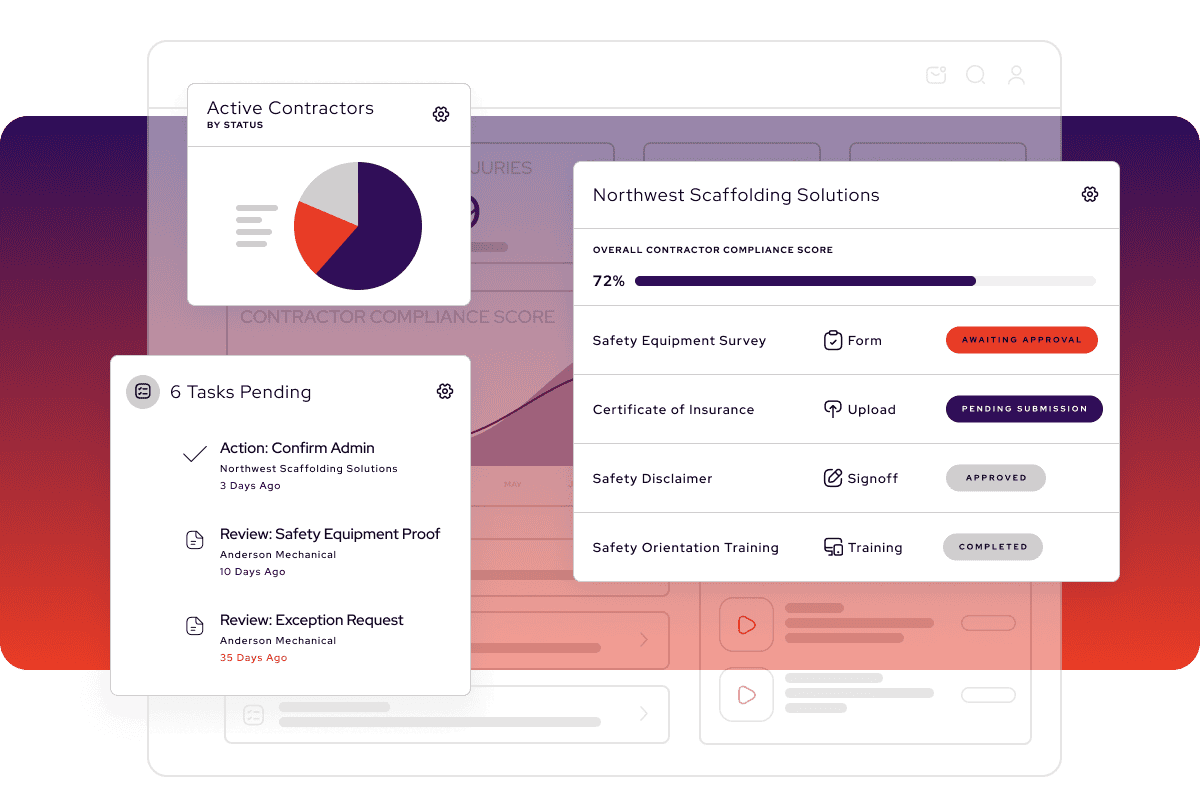
The recurring requirements feature is where the expiration problem actually gets solved. When you mark a COI upload as recurring, the system tracks the expiration date and automatically re-opens the requirement when it’s due. The contractor gets notified. They resubmit. You see the new version. No calendar reminders, no manual follow-ups — the re-qualification cycle runs on its own.
Site access verification works the same way. As a contractor admin adds their employees to the system, those workers are automatically assigned your site safety orientation. Completion is tracked in real time. Before anyone arrives on site, you can confirm — with an auditable record — that they’ve finished the training. “I think so” becomes “yes, completed March 14.”As contractors work through their requirements, Novara scores them continuously against your criteria. When a contractor hits 100% completion, their status can update automatically — pending to approved — without anyone on your team touching it. What’s left is reviewing exceptions and handling the unusual cases. That’s a different job than chasing down documents. It’s also a much lower-risk one.
As contractors work through their requirements, Novara scores them continuously against your criteria. When a contractor hits 100% completion, their status can update automatically — pending to approved — without anyone on your team touching it. What’s left is reviewing exceptions and handling the unusual cases. That’s a different job than chasing down documents. It’s also a much lower-risk one.